// PERSONAL
A C#/.NET SHIFT-SCHEDULING APP, BUILT TO CLOSE THE MOST COMMON SKILL GAP IN MY JOB SEARCH
A small roster-management app — JWT auth with role-based access, full CRUD, a shift-overlap validation rule, a week-based scheduling UI — built to get real, hands-on ASP.NET Core + EF Core experience for the single most common backend stack showing up in the NZ postings I couldn't yet honestly apply for.
- CLIENT
- Personal project
- ROLE
- Back-end development, Front-end development
- DURATION
- Six milestone sessions, scaffold through live deploy
- YEAR
- 2026
ShiftBoard exists because of a gap, not a feature idea: ASP.NET Core + React was, by a wide margin, the most common backend pairing in the NZ roles I was scanning — Datacom, Sandfield, AUT, Aderant, Techspace, Marsello, Robert Half and more all posted it. Rather than claim familiarity on an application form on faith, I built a real shift-scheduling app with it — JWT auth, role-based access, full CRUD, a genuine business rule, deployed — end to end, in six build milestones.
Two bugs that only showed up by running it
Reading the code said everything was fine. Running it said otherwise. The week-view header was
rendering as literal garbage text ("Aug 3 – 2026 (day: 9)") because of an Intl.DateTimeFormat
options combination ({ day, year } with no month) that this particular environment handled
oddly — a one-line fix once caught, invisible from the code alone. Separately, the shift list's
first draft called a small C# helper method inside an EF Core .Select() projection to shape the
response DTO. That compiles cleanly and looks completely normal — but EF Core can't translate an
arbitrary method call into SQL, so it would have thrown InvalidOperationException the first
time anyone actually loaded the shifts page. Both went unnoticed until the app was actually
clicked through in a browser and hit with real requests, not just read.
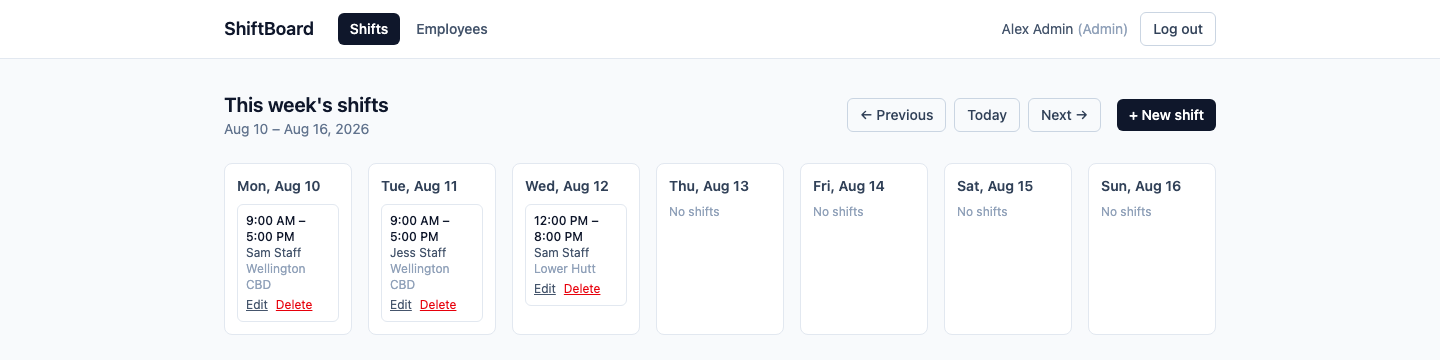
A validation rule, not just CRUD
The one business rule that makes this more than a CRUD demo: an employee can't be double-booked
across two shifts. That's an interval-overlap check (start < existingEnd && end > existingStart)
run against every create and update, correctly excluding a shift from its own overlap check when
it's being edited. Access control follows a simple, deliberate split too — any authenticated user
can read the roster, but only Admins can create, edit, or delete shifts, locations, or other
employees' records — modelled as "managers build the schedule, staff view it," not a hard
requirement of the brief, just the design that made sense for the domain.
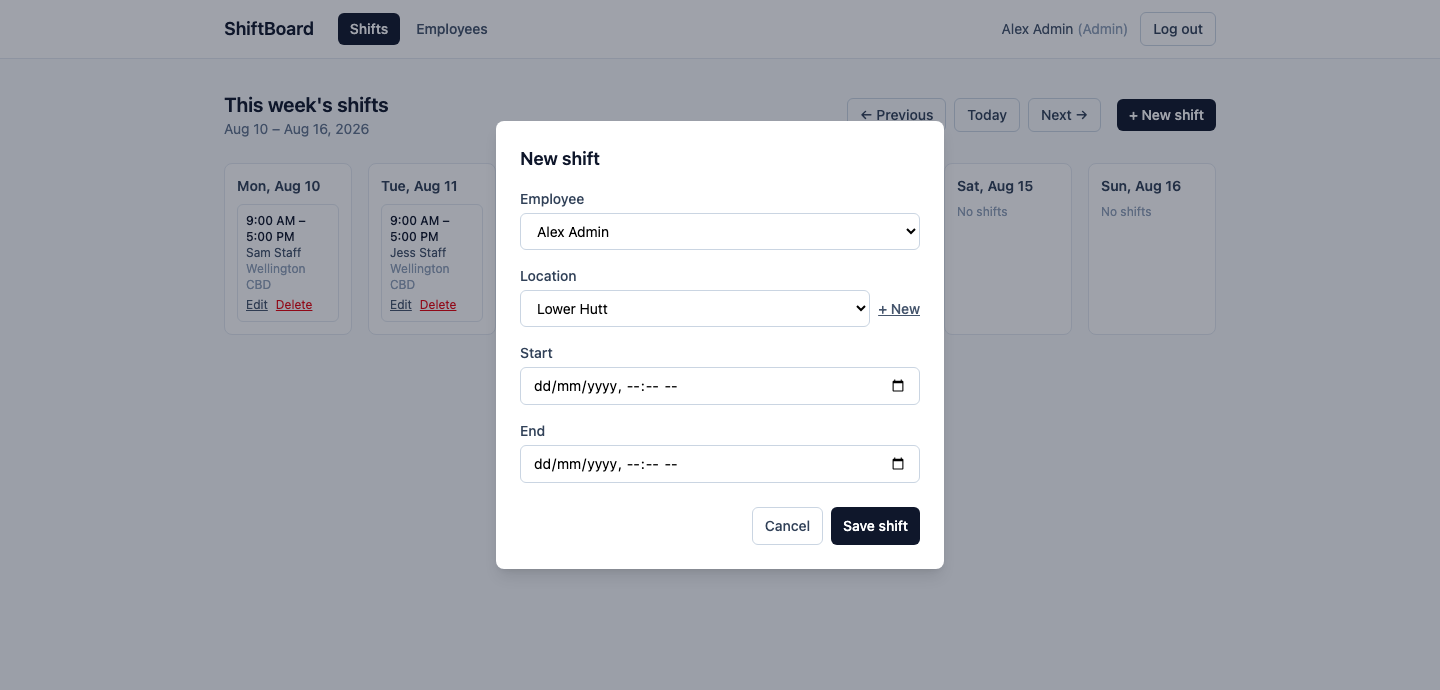
The overlap check and the "who can do what" split both surface in the same form — adding a shift picks from the existing employee/location set (or creates a location inline) and validates start and end times before it ever reaches the API.
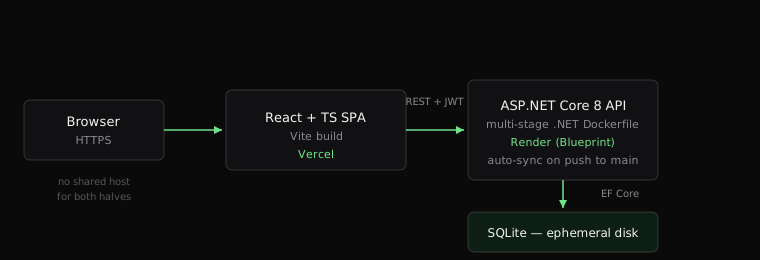
Deploying a stack that doesn't fit one host
The frontend and backend don't share a home: Vercel runs Node/static/serverless workloads, not
long-running ASP.NET Core APIs. The API is containerised (a multi-stage .NET 8 Dockerfile) and
deployed to Render as a Blueprint (render.yaml), which re-syncs automatically on every push to
main; the React frontend deploys separately to Vercel, pointed at the live API via an
environment variable. The JWT signing key never touches git either way — dotnet user-secrets
locally, Render's generateValue for the deployed key.
What's actually built, and what isn't
Auth, employee/location/shift CRUD, the overlap check, and the week-view calendar all work end
to end against a live deploy, not a demo mode — shiftboard-web-theta.vercel.app,
with the API's Swagger UI left open at /swagger since there's no real user data at risk. What's
not built, deliberately: role-based access is role-only, not ownership-based (any Admin can edit
any shift, there's no "staff can only edit their own" concept), and JWTs are stateless, so
deleting an employee doesn't invalidate a token they've already been issued — it just expires
normally. SQLite runs on Render's free-tier ephemeral disk, so the demo data resets on every
restart — intentional, since the seed script immediately repopulates the same clean dataset.